
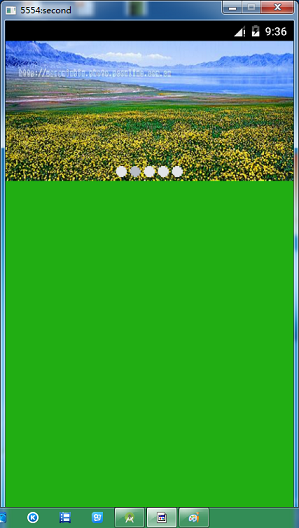
viewPager+Handler+Timer实现广告轮播
基本思想是在 Avtivity 中放一个 ViewPager ,然后通过监听去实现联动效果 , 代码理由详细的解释,我就不说了。
MainActivity.java
  1 package com.example.administrator.imageviewlunbodemo;
  2
  3 import android.app.Activity;
  4 import android.os.Bundle;
  5 import android.os.Handler;
  6 import android.os.Message;
  7 import android.support.v4.view.PagerAdapter;
  8 import android.support.v4.view.ViewPager;
  9 import android.view.LayoutInflater;
 10 import android.view.View;
 11 import android.view.ViewGroup;
 12 import android.widget.ImageView;
 13
 14 import java.util.ArrayList;
 15 import java.util.List;
 16 import java.util.Timer;
 17 import java.util.TimerTask;
 18
 19
 20 public class MainActivity extends Activity {
 21
 22     private ViewPager myViewPager;
 23     private List<View> myContiontar = new ArrayList<>();   //viewPager的数据源
 24     private PagerAdapter myPagerAdapter;   //有了数据源,必然要有适配器
 25
 26     private ImageView imageView1;
 27     private ImageView imageView2;
 28     private ImageView imageView3;
 29     private ImageView imageView4;
 30     private ImageView imageView5;
 31
 32     private Timer mTimer;
 33     private Timertask mTimertask;
 34
 35     @Override
 36     protected void onCreate(Bundle savedInstanceState) {
 37         super.onCreate(savedInstanceState);
 38         setContentView(R.layout.activity_main);
 39
 40         initViews();  //初始化各种View
 41
 42         myViewPager.setOnPageChangeListener(new ViewPager.OnPageChangeListener() {
 43             @Override
 44             public void onPageScrolled(int i, float v, int i2) {
 45
 46             }
 47
 48             @Override
 49             public void onPageSelected(int i) {
 50                 selectImageId(i);
 51             }
 52
 53             @Override
 54             public void onPageScrollStateChanged(int i) {
 55
 56             }
 57         });
 58
 59         mTimertask = new Timertask();
 60         mTimer = new Timer();
 61         mTimer.schedule(mTimertask,0,2000);
 62 //        //启动时选择第一张图片
 63 //        imageView1.setBackgroundResource(R.drawable.wallet_coin_purse_guide_purse_dot_select);
 64
 65
 66     }
 67
 68     //初始化各种View
 69     private void initViews(){
 70         // 先将xml文件 换成 view
 71         myViewPager = (ViewPager) findViewById(R.id.viewpager);
 72
 73         imageView1 = (ImageView) findViewById(R.id.first_fragment_down_image1);
 74         imageView2 = (ImageView) findViewById(R.id.first_fragment_down_image2);
 75         imageView3 = (ImageView) findViewById(R.id.first_fragment_down_image3);
 76         imageView4 = (ImageView) findViewById(R.id.first_fragment_down_image4);
 77         imageView5 = (ImageView) findViewById(R.id.first_fragment_down_image5);
 78
 79         //建立五个view 去获得四个ImageView
 80         View view1 = LayoutInflater.from(getApplicationContext()).inflate(R.layout.lunbo_image1, null);
 81         View view2 = LayoutInflater.from(getApplicationContext()).inflate(R.layout.lunbo_image2,null);
 82         View view3 = LayoutInflater.from(getApplicationContext()).inflate(R.layout.lunbo_image3, null);
 83         View view4 = LayoutInflater.from(getApplicationContext()).inflate(R.layout.lunbo_image4, null);
 84         View view5 = LayoutInflater.from(getApplicationContext()).inflate(R.layout.lunbo_image5,null);
 85         //加入到容器里面
 86         myContiontar.add(view1);
 87         myContiontar.add(view2);
 88         myContiontar.add(view3);
 89         myContiontar.add(view4);
 90         myContiontar.add(view5);
 91         //初始化 适配器
 92         myPagerAdapter = new PagerAdapter() {
 93             //返回显示多少项
 94             @Override
 95             public int getCount() {
 96                 return myContiontar.size();
 97             }
 98
 99             @Override
100             public boolean isViewFromObject(View view, Object o) {
101                 return view == o;
102             }
103             //滑动切换时,移除当前组件
104             @Override
105             public void destroyItem(ViewGroup container, int position, Object object) {
106                 container.removeView(myContiontar.get(position));
107             }
108             //没次滑动时生成的组件
109             @Override
110             public Object instantiateItem(ViewGroup container, int position) {
111                 container.addView(myContiontar.get(position));
112                 return myContiontar.get(position);
113             }
114         };
115         //设置适配器
116         myViewPager.setAdapter(myPagerAdapter);
117     }
118
119     //选择那个图片
120     private void selectImageId(int i){
121         initImageBackGround();
122         switch (i){
123             case 0:
124                 imageView1.setBackgroundResource(R.drawable.wallet_coin_purse_guide_purse_dot_select);
125                 break;
126             case 1:
127                 imageView2.setBackgroundResource(R.drawable.wallet_coin_purse_guide_purse_dot_select);
128                 break;
129             case 2:
130                 imageView3.setBackgroundResource(R.drawable.wallet_coin_purse_guide_purse_dot_select);
131                 break;
132             case 3:
133                 imageView4.setBackgroundResource(R.drawable.wallet_coin_purse_guide_purse_dot_select);
134                 break;
135             case 4:
136                 imageView5.setBackgroundResource(R.drawable.wallet_coin_purse_guide_purse_dot_select);
137                 break;
138         }
139     }
140     //初始化 所有Image的背景
141     private void initImageBackGround(){
142         imageView1.setBackgroundResource(R.drawable.wallet_coin_purse_guide_purse_dot_normal);
143         imageView2.setBackgroundResource(R.drawable.wallet_coin_purse_guide_purse_dot_normal);
144         imageView3.setBackgroundResource(R.drawable.wallet_coin_purse_guide_purse_dot_normal);
145         imageView4.setBackgroundResource(R.drawable.wallet_coin_purse_guide_purse_dot_normal);
146         imageView5.setBackgroundResource(R.drawable.wallet_coin_purse_guide_purse_dot_normal);
147     }
148
149     int count = 0;
150     private Handler mhandler = new Handler(){
151
152         @Override
153         public void handleMessage(Message msg) {
154             super.handleMessage(msg);
155             if (msg.what == 0x111){
156                 //操作
157                 count++;
158                 myViewPager.setCurrentItem(count % 5);
159             }
160         }
161     };
162
163     //建立一个Timertask
164     class Timertask extends TimerTask{
165
166         @Override
167         public void run() {
168             mhandler.sendEmptyMessage(0x111);  //发送空消息
169         }
170     }
171 }
主布局文件里面放了一个 ViewPager 和五个 ImageView (就是那种小点点)
activity_main.xml
<LinearLayout
    xmlns:android="http://schemas.android.com/apk/res/android"
    xmlns:tools="http://schemas.android.com/tools"
    android:layout_width="match_parent"
    android:layout_height="match_parent"
    android:orientation="vertical"
    tools:context=".MainActivity">

    <FrameLayout
        android:layout_width="match_parent"
        android:layout_height="0dp"
        android:layout_weight="1"
        android:orientation="vertical"
        android:gravity="center|bottom">
        <android.support.v4.view.ViewPager
            android:id="@+id/viewpager"
            android:layout_width="match_parent"
            android:layout_height="match_parent">
        </android.support.v4.view.ViewPager>
        <LinearLayout
            android:layout_width="wrap_content"
            android:layout_height="wrap_content"
            android:layout_marginBottom="5dp"
            android:orientation="horizontal"
            android:layout_gravity="center|bottom">
            <ImageView
                android:id="@+id/first_fragment_down_image1"
                android:layout_width="wrap_content"
                android:layout_height="wrap_content"
                android:layout_marginLeft="2dp"
                android:layout_marginRight="2dp"
                android:background="@drawable/wallet_coin_purse_guide_purse_dot_normal"/>
            <ImageView
                android:id="@+id/first_fragment_down_image2"
                android:layout_width="wrap_content"
                android:layout_height="wrap_content"
                android:layout_marginLeft="2dp"
                android:layout_marginRight="2dp"
                android:background="@drawable/wallet_coin_purse_guide_purse_dot_normal"/>
            <ImageView
                android:id="@+id/first_fragment_down_image3"
                android:layout_width="wrap_content"
                android:layout_height="wrap_content"
                android:layout_marginLeft="2dp"
                android:layout_marginRight="2dp"
                android:background="@drawable/wallet_coin_purse_guide_purse_dot_normal"/>
            <ImageView
                android:id="@+id/first_fragment_down_image4"
                android:layout_width="wrap_content"
                android:layout_height="wrap_content"
                android:layout_marginLeft="2dp"
                android:layout_marginRight="2dp"
                android:background="@drawable/wallet_coin_purse_guide_purse_dot_normal"/>
            <ImageView
                android:id="@+id/first_fragment_down_image5"
                android:layout_width="wrap_content"
                android:layout_height="wrap_content"
                android:layout_marginLeft="2dp"
                android:layout_marginRight="2dp"
                android:background="@drawable/wallet_coin_purse_guide_purse_dot_normal"/>
        </LinearLayout>
    </FrameLayout>
    <ImageView
        android:layout_width="match_parent"
        android:layout_height="0dp"
        android:layout_weight="2.5"
        android:background="@color/fitst_fragment_image_color"/>
</LinearLayout>
在 ViewPager 中我创建了五个布局文件,都很简单,里面就只有一个 ImageView 去显示图片
images.xml
<?xml version="1.0" encoding="utf-8"?>
<LinearLayout
    xmlns:android="http://schemas.android.com/apk/res/android"
    android:orientation="vertical"
    android:layout_width="match_parent"
    android:layout_height="match_parent">
    <ImageView
        android:id="@+id/first_fragment_lunbo_image1"
        android:layout_width="match_parent"
        android:layout_height="match_parent"
        android:background="@drawable/image1"
        />
</LinearLayout>
然后在用 Timer 让它每隔 2 秒去发送一次消息,通知 ViewPager 更新 , 就形成了简单的图片轮播效果。
效果图 :
 查看1道真题和解析